Aether Gazer on Linux: Fix Older GPU / DX11 Vulkan Errors (Proton-Sarek)
If Aether Gazer fails to launch on Linux because your GPU does not support the required DX11 or Vulkan version (when using Proton-GE or Proton-CachyOS), there are two fixes: install Proton-Sarek, or force Wine’s DX9 renderer with an environment variable. This guide covers both using Heroic Games Launcher.
Which fix should I use?
Section titled “Which fix should I use?”| Situation | Fix |
|---|---|
| GPU is old but supports some Vulkan | Install Proton-Sarek |
| GPU is older than Proton-Sarek supports | Force Wine DX9 with PROTON_USE_WINED3D=1 |
1. Install Proton-Sarek from ProtonPlus
Section titled “1. Install Proton-Sarek from ProtonPlus”ProtonPlus bundles the newest Proton releases, including Proton-Sarek.
| Source | Link |
|---|---|
| Flathub | https://flathub.org/en/apps/com.vysp3r.ProtonPlus |
| GitHub | https://github.com/Vysp3r/protonplus |
-
Download ProtonPlus.
- From Flathub, click the green Install button.
- From GitHub, download the native package for your distribution (RPM for Fedora/Red Hat, DEB for Debian/Ubuntu, or an Arch package for Arch) and install it with your package manager.
-
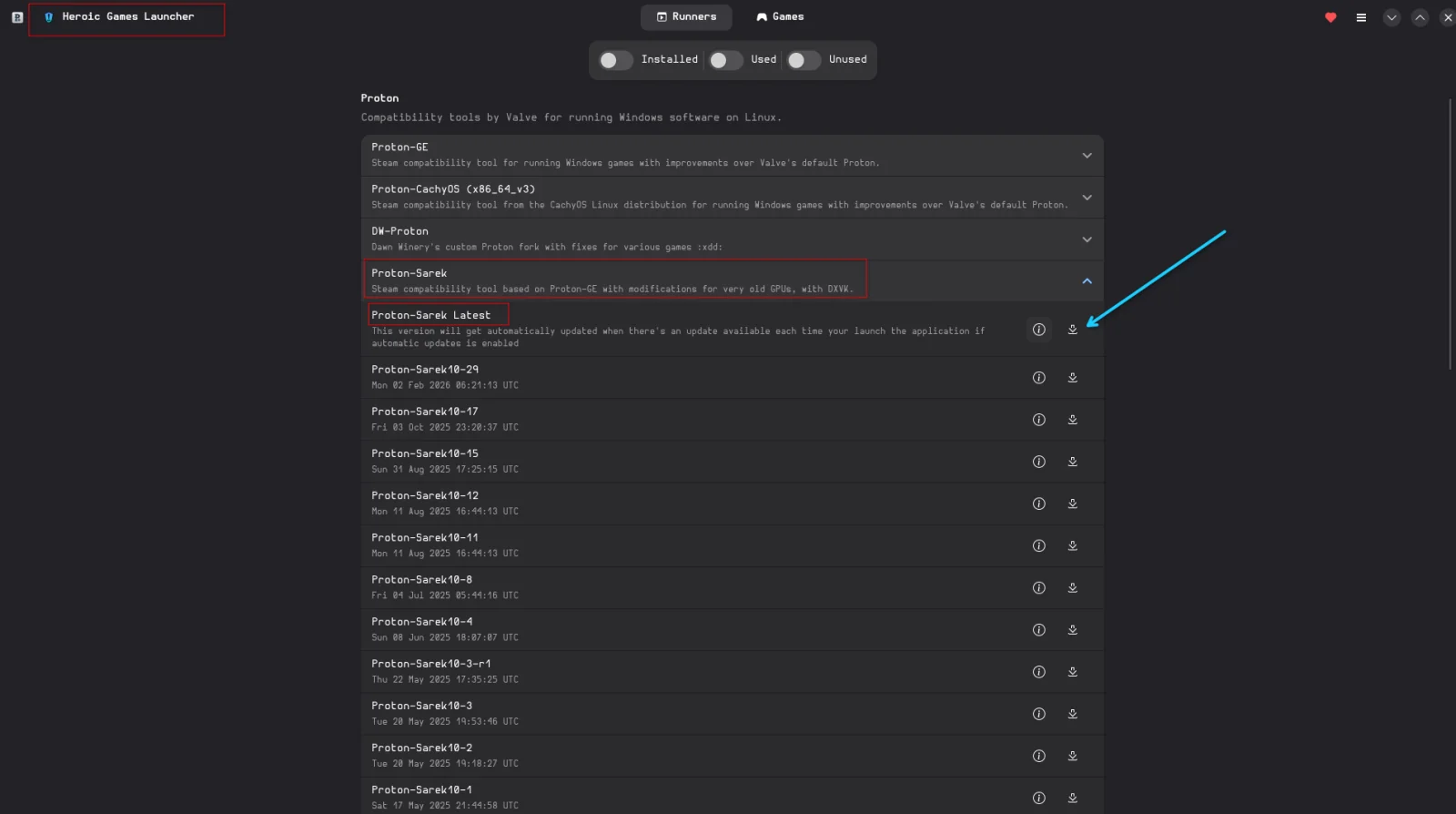
Open ProtonPlus and select the launcher you use (Heroic in this case) in the top-left drop-down menu.
-
Click Install Proton-Sarek Latest with the download icon.
-
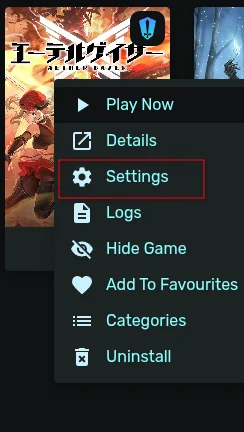
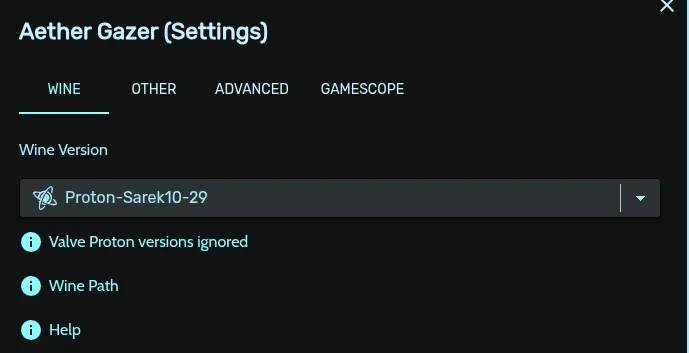
Re-launch Heroic and change Aether Gazer’s Wine/Proton version to Proton-Sarek Latest.
-
Launch the game. It should now start normally.
-
Play and have fun.
2. Force Wine DX9 with an environment variable
Section titled “2. Force Wine DX9 with an environment variable”If your hardware is older than what Proton-Sarek supports, you can fall back to Wine’s DirectX 9 renderer.
-
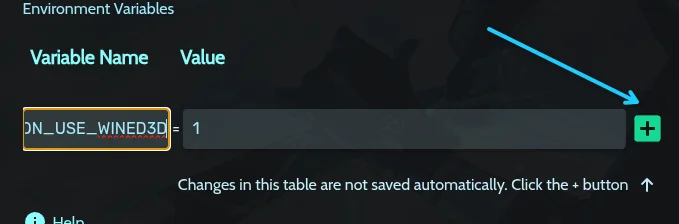
In Aether Gazer’s settings in Heroic (right click, then Settings), go to Advanced and add this environment variable:
PROTON_USE_WINED3D=1Use the copy button on the code block when you hover over it.
-
Launch the game and play.
What does this do?
PROTON_USE_WINED3Dtells Proton to use the OpenGL-based wined3d backend instead of the Vulkan-based DXVK for D3D10/D3D11.
Gameplay
Section titled “Gameplay”Frequently asked questions
Section titled “Frequently asked questions”Why does Aether Gazer not launch on my old GPU on Linux? The game needs DX11 support, and Proton-GE and Proton-CachyOS translate it to Vulkan through DXVK. If your GPU does not support the required Vulkan version, the game fails to start.
What is Proton-Sarek? Proton-Sarek is a Proton build that adds better Vulkan support for older GPUs. You can install it from ProtonPlus.
What does PROTON_USE_WINED3D=1 do? It makes Proton use the OpenGL-based wined3d renderer instead of the Vulkan-based DXVK for D3D10/D3D11, which helps on hardware that cannot run DXVK.
Do I need Heroic Games Launcher? This guide uses Heroic, but the same Proton version and environment variable apply in other launchers that let you pick a Proton build and set variables.
Game key art and screenshots are © their respective owners and are shown here for identification only.