Chaos Zero Nightmare on Linux: Heroic Games Launcher Guide (Stove + WebView2)
Set up Chaos Zero Nightmare in Heroic
Section titled “Set up Chaos Zero Nightmare in Heroic”-
Stop the launcher in Heroic if you already ran into the bug.
-
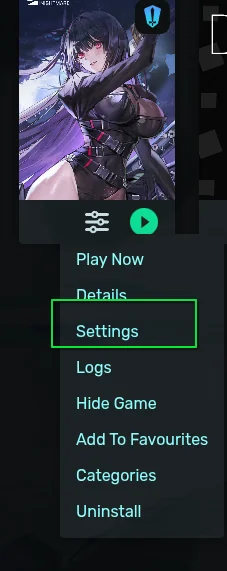
Right-click the Chaos Zero Nightmare entry in Heroic and choose Settings.
-
In Wine version, pick Proton-GE (or Proton-CachyOS, both work).
-
Install WebView2 and Stove into the same prefix (see What you need for the downloads), then launch the game from Heroic. If Stove will not launch, use the crashpad fix.
Troubleshooting
Section titled “Troubleshooting”- Install freezes: see Fix: install freeze.
- Stove will not launch afterwards: see crashpad_handler.exe.
Game key art and screenshots are © their respective owners and are shown here for identification only.